See exact usage
Open the matching pages, templates, patterns, and navigations behind each block.
One Gutenberg toolkit, two clear editions
Start free with unlimited Gutenberg block discovery in Lite. Add Pro when exact content matching, exports, network reporting, or safer Refactor workflows become part of the job.
See exact usage
Open the matching pages, templates, patterns, and navigations behind each block.
Narrow the scope
Filter by block content, attributes, and other evidence before deciding what changes.
Change with guardrails
Preview and review bulk updates before apply, then validate or roll back from batch history.
DXM Block Toolkit
Lite for complete discovery. Pro for precise targeting, transformation, automation, and reporting.
Choose the edition
Lite and Pro are separate plugins with one shared workflow. Install Lite first; Pro extends it without replacing or limiting the discovery foundation.
Index every supported Gutenberg source, inspect block inventory and exact sources, apply attribute filters, and keep scan health visible without a commercial key or arbitrary limits.
Explore LiteAdd content matching, controlled Refactor batches, CSV and JSON exports, and multisite cross-site reporting on top of the Lite index.
View Pro pricing| Capability | Lite — free | Pro — yearly subscription |
|---|---|---|
| Index all supported Gutenberg sources | Included | Included through Lite |
| Block inventory and source drill-down | Included | Included through Lite |
| Class, anchor, and block-attribute filters | Included | Included through Lite |
| Manual, incremental, and daily recurring scans | Included | Included through Lite |
| Scan health, comparisons, and recent history | Included | Included through Lite |
| Content matching | — | Included |
| Refactor preview, diff, and apply | — | Included |
| Refactor history and rollback | — | Included; existing access remains after expiry |
| CSV and JSON exports | — | Included |
| Multisite cross-site reporting | Current site | Included |
Why teams buy it
Gutenberg block usage is spread across posts, pages, reusable patterns, template parts, and navigation structures. DXM Block Toolkit helps teams replace guesswork with a current, reviewable picture of what is actually in use.
The same block can appear across content, reusable assets, and theme-level structures that are easy to miss in manual checks.
Without exact source evidence, teams spend too long confirming impact or move forward without enough confidence.
Even when the right change is obvious, site-wide edits still need preview, review, and follow-up paths.
Product workflow
DXM Block Toolkit starts with a site-wide index, then carries teams through exact source review, filtered evidence, scan freshness checks, and safer Refactor batches from the same workflow.
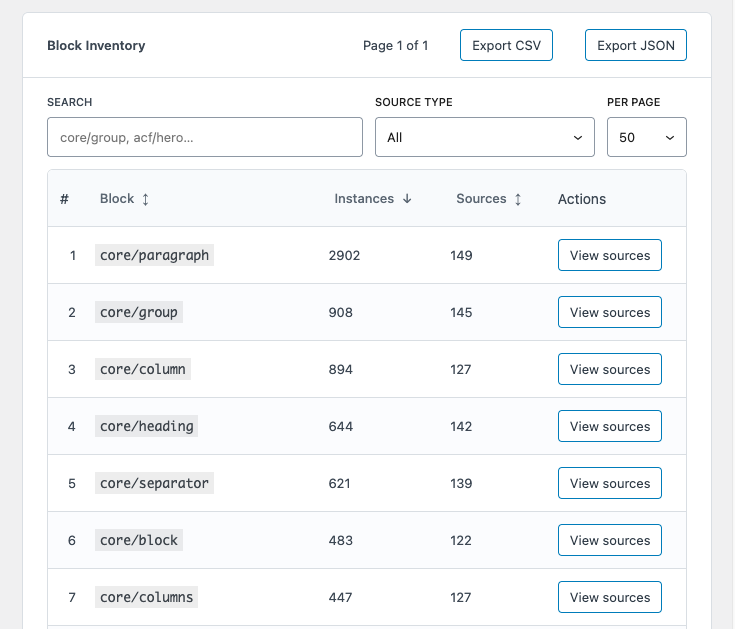
Lite inventory · Pro exports
Lite maps the Gutenberg footprint by block type, with instance and source counts that make broad usage patterns easy to compare. The CSV and JSON controls in this shared view belong to Pro.
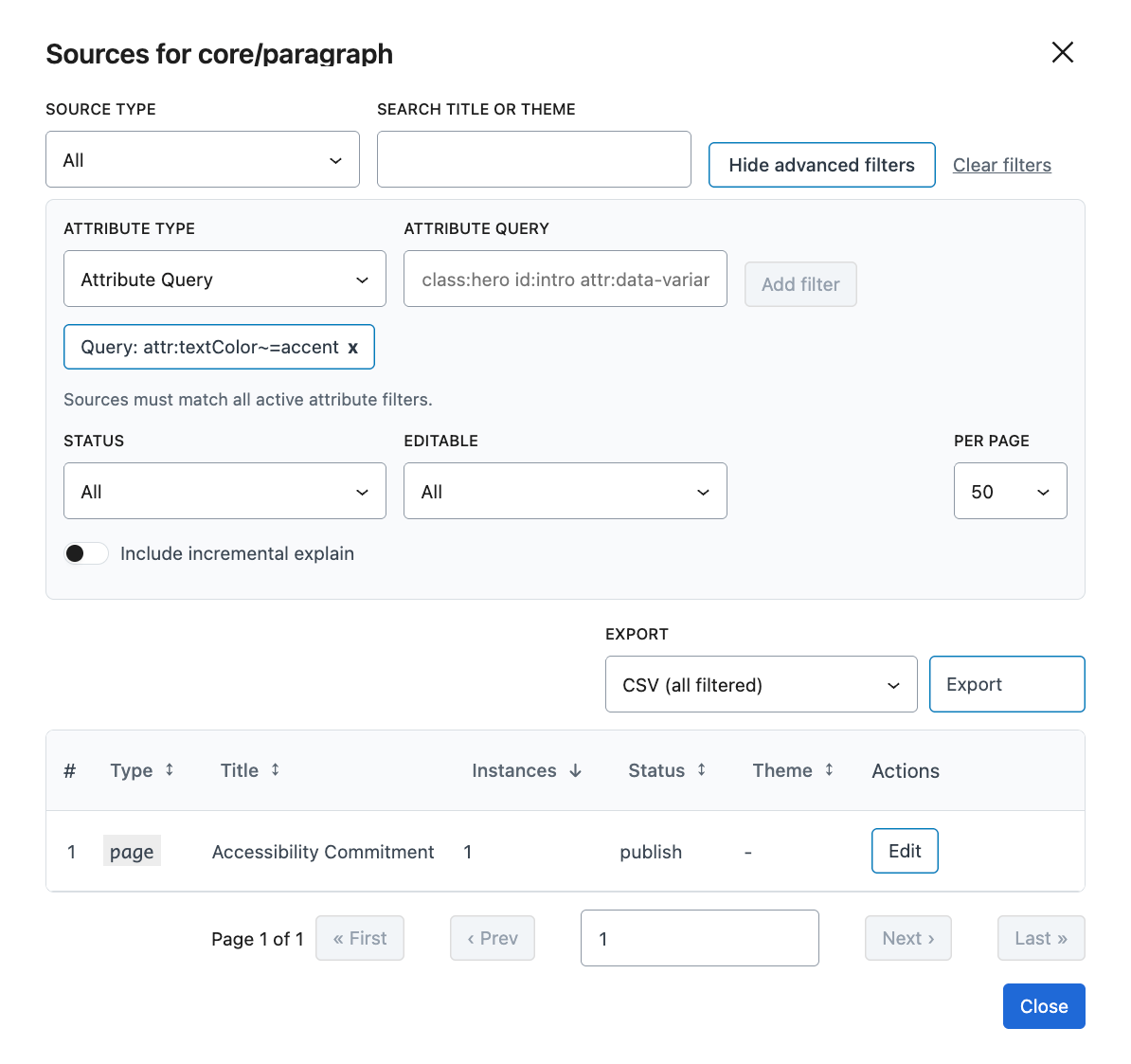
Lite · Source drill-down
Open the exact source rows for a block and narrow them with source metadata, class, ID or anchor, and indexed attribute path/value filters.
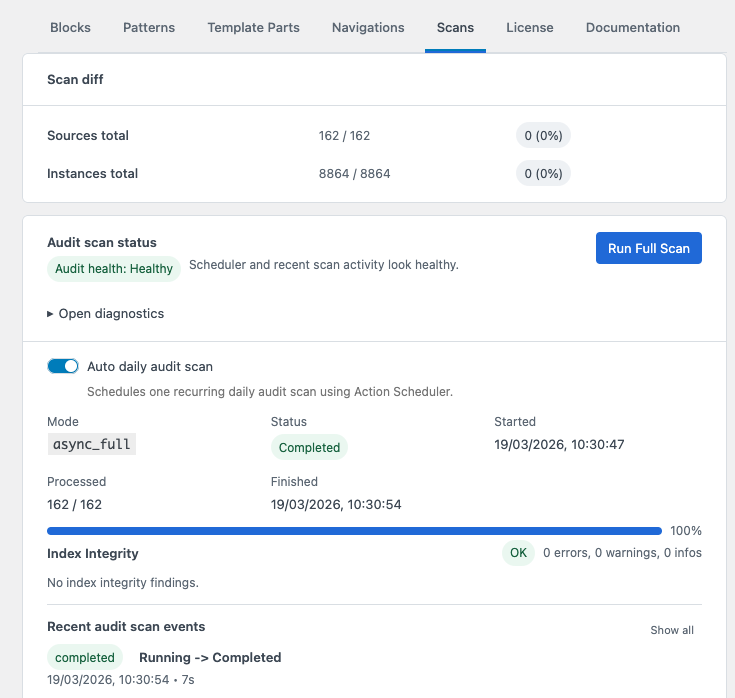
Lite · Scans and health
A full scan builds the index. Health, baseline comparison, daily scheduling, and recent events show whether the discovery evidence is current enough to trust.
Pro · Content matching
Pro narrows a block type by normalized saved text, with exact or contains matching, optional case sensitivity, and scope for the current block or its nested blocks.
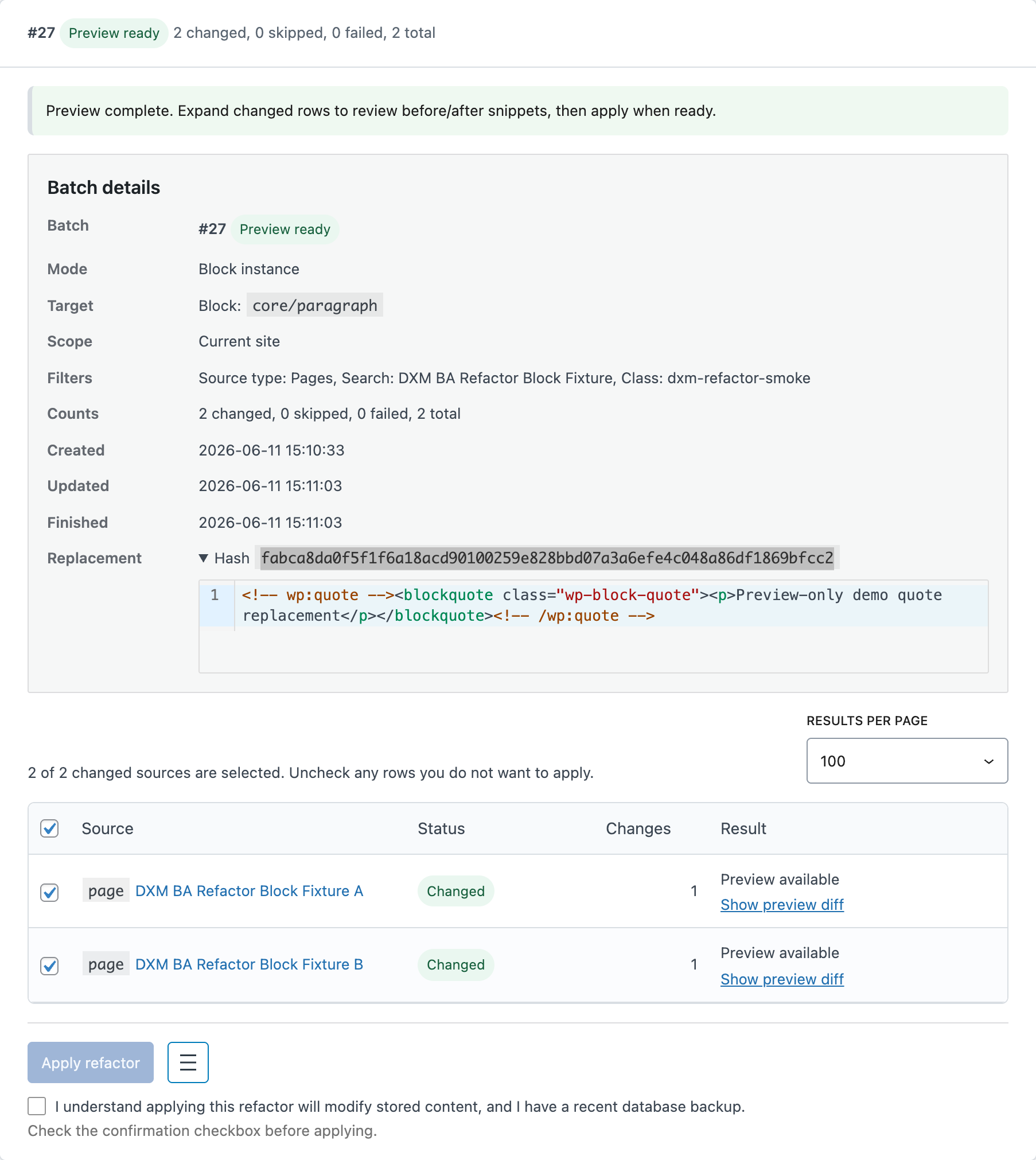
Pro · Refactor
Refactor preserves the operation trail from preview through apply and rollback, including row counts and statuses for each batch.
Operational coverage
DXM Block Toolkit Lite keeps reusable content, theme-level structures, site-level multisite scenarios, and unlimited discovery workflows in scope. Pro extends that foundation when teams need network reporting or controlled changes.
Review pattern usage separately from raw block totals when shared content needs its own change plan.
Inspect template part references and unresolved targets before theme cleanup or release work moves forward.
Keep direct navigation references in scope before cleanup, migration, or redesign work lands.
Support multisite indexing while keeping scan execution anchored to the relevant site context.
Run manual, incremental, and daily scans without caps or a commercial key, then review health, comparisons, and recent history.
How teams use it
The usual flow is simple: build or refresh the site-wide index, inspect what is in use, confirm the exact change boundary, then hand off the results or continue into Refactor when bulk updates are next.
Build the current indexed view from the stored WordPress content.
Inspect blocks, patterns, template parts, and navigations in one place.
Open matching sources, narrow by block content or attributes, and decide what actually belongs in scope.
Export reviewed findings for other teams, or move into previewable replacement batches when the next step is execution.
Operational fit
The UI stays calm, but the product is built for repeatable operational work across admin, CLI, and API-supported workflows.
Lite inventory, source review, scan status, and configuration are available through a REST surface; Pro extends it for entitled operations.
Run scan and reporting tasks in repeatable command-line flows when UI clicks are not enough.
Preview, apply, row outcomes, and rollback history keep site-wide change work inspectable instead of opaque.
Network Admin can surface aggregated inventory visibility while scans still run in the relevant site context.
DXM Block Toolkit Pro
Upgrade from the free Lite foundation when your workflow needs Pro content matching, Refactor, exports, or cross-site reporting. Billing, renewal, cancellation, tax or VAT handling, and invoices are handled through Lemon Squeezy as Merchant of Record.
Single
$129/year
Best for one production site.
DXM Block Toolkit Pro for independent builders and lean teams managing one production site.
Agency
$299/year
Best for agencies and teams managing multiple production sites.
DXM Block Toolkit Pro for agencies and teams managing multiple production sites.
Yearly subscription billed in USD. Lemon Squeezy checkout shows the final charged amount, including any applicable tax or VAT, before purchase. Plans renew yearly until canceled in the Lemon Squeezy billing portal. Initial purchases are eligible for refund within 14 days.
Support and operations
Answers to the questions teams usually ask before purchase, rollout, and recurring scan or refactor work.
Start with the docs for install, scanning, filtering, and Refactor guidance, or contact support if your team needs a direct answer before rollout.
DXM Block Toolkit scans stored Gutenberg content and indexes supported source types across blocks, patterns, template parts, navigations, and related editorial content.
Scans do not modify post content. They read stored Gutenberg content and write only to DXM Block Toolkit index tables. Refactor can modify stored content, but only after you configure a batch, review a read-only diff preview, and explicitly apply the changes.
Yes. Registered custom blocks that appear in indexed content are surfaced alongside core blocks in the inventory.
Lite supports site-active or network-active indexing for the current site. Pro adds entitled cross-site inventory and selected-site drill-down in Network Admin.
CSV and JSON exports for inventory and source-level evidence are Pro capabilities. Lite keeps the complete inventory and source drill-down usable without disabled export controls.
Lite includes class, ID or anchor, and indexed block-attribute filters. Pro adds content matching and can reuse that content-aware scope in Refactor.
Sometimes, but only when the exact string is already known or one quick block list is enough. DXM Block Toolkit is the better fit when the harder question is which exact sources stay in scope, which block variant should change, and how the team reviews a controlled batch before apply.
No. Lite manual scans, incremental indexing, daily recurring scans, comparisons, recent history, and health information do not require a commercial key. A Pro key governs only Pro capabilities and Pro updates.
Lite and Pro code are licensed under GPLv2 or later. Pro subscriptions cover one or up to 50 production-site entitlements, subscription-backed Pro updates and support, and related account-backed services. Plans renew yearly until canceled in the billing portal. Lemon Squeezy shows the final amount, including applicable tax or VAT, before purchase; initial purchases have a 14-day commercial refund window.
Start free, extend when needed
Start with complete Gutenberg discovery in Lite. Add Pro when the work needs content matching, exports, network reporting, or controlled Refactor batches.