Lite

Free Gutenberg block discovery for WordPress

Find where Gutenberg blocks are used — free.

Build a current Gutenberg block inventory, open the exact sources behind each result, narrow them with attribute filters, and check scan health — without a commercial key or arbitrary limits.

Coming soon on WordPress.orgCompare with Pro
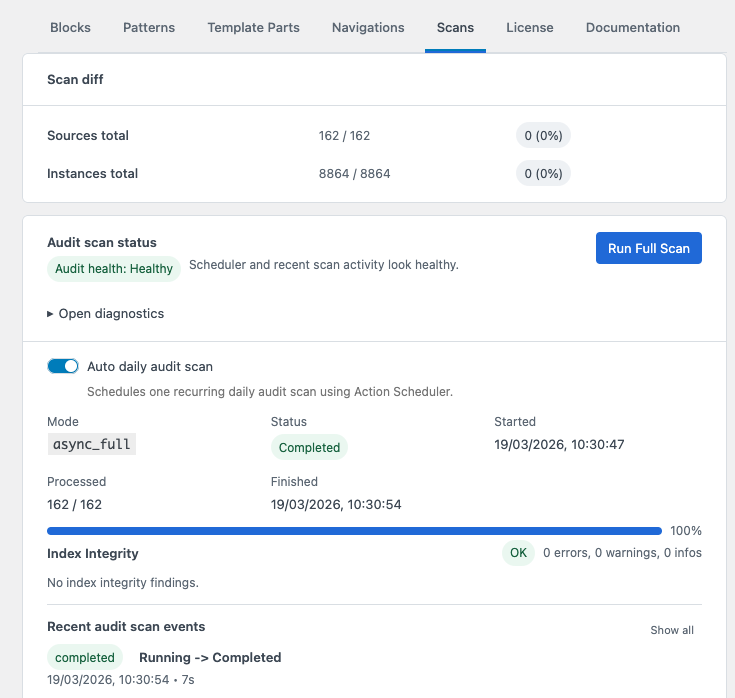
DXM Block Toolkit Lite Scans view with baseline comparison, health, recurring scans, and recent history.

DXM Block Toolkit Lite

Unlimited discovery across supported Gutenberg sources, with inventory, drill-down, attribute filters, and scan health.

What Lite includes

Discovery remains complete from scan to source evidence.

Lite keeps the full discovery loop together: build the index, inspect exact sources, and verify that the baseline is current.

Lite

A useful block inventory, not a teaser

The inventory is built for day-to-day audits, not as a limited preview. It gives you a searchable overview of the blocks indexed across the site, then lets you move from a high-level count to the exact sources behind it.

  • Search by readable block title, registered name, or namespace.
  • Compare instance totals, distinct source counts, and distribution across source types.
  • Open the matching sources for any block and move from the overview to the relevant records in one step.
DXM Block Toolkit Lite inventory showing block names, instance totals, source counts, and source actions.

A useful block inventory, not a teaser

DXM Block Toolkit Lite inventory showing block names, instance totals, source counts, and source actions.

Lite

Exact sources with practical filters

Counts become actionable when you can identify the entries behind them. Lite opens the matching source records with enough context to narrow a large result set before you inspect individual pages, templates, patterns, or navigations in WordPress.

  • Filter by source type and status to separate relevant content from the rest of the index.
  • Match class names, HTML IDs or anchors, and indexed block attributes.
  • Keep the narrowed source list visible while deciding which records need closer inspection.
DXM Block Toolkit Lite source drill-down with attribute filters.

Exact sources with practical filters

DXM Block Toolkit Lite source drill-down with attribute filters.

Lite

Scan confidence stays in Lite

A block inventory is only trustworthy when you know how current and complete it is. Lite keeps scan activity and health signals visible, so stale, incomplete, or failed indexing does not look like valid evidence.

  • Start full scans and follow processed totals, completion state, and runtime.
  • Use the recurring daily scan to keep the baseline current between manual audits.
  • Review diagnostics, index-integrity findings, baseline comparisons, and recent scan events.
DXM Block Toolkit Lite scan health and recent scan information.

Scan confidence stays in Lite

DXM Block Toolkit Lite scan health and recent scan information.

Start with discovery. Add Pro when the work moves further.

Lite is the complete discovery foundation. Pro extends that same index when precise targeting, transformation, export, or cross-site reporting is needed.

DXM Block Toolkit edition comparison
CapabilityLite — freePro — yearly subscription
Index all supported Gutenberg sourcesIncludedIncluded through Lite
Block inventory and source drill-downIncludedIncluded through Lite
Class, anchor, and block-attribute filtersIncludedIncluded through Lite
Manual, incremental, and daily recurring scansIncludedIncluded through Lite
Scan health, comparisons, and recent historyIncludedIncluded through Lite
Content matchingIncluded
Refactor preview, diff, and applyIncluded
Refactor history and rollbackIncluded; existing access remains after expiry
CSV and JSON exportsIncluded
Multisite cross-site reportingCurrent siteIncluded

Installation model

Lite first. Pro only when you need it.

Lite installs as a normal WordPress plugin and works on its own. Pro is a separate add-on that depends on Lite.

  1. Install and activate DXM Block Toolkit Lite.
  2. Open DXM → DXM Block Toolkit and run a full scan.
  3. If you purchase Pro, install its separate ZIP after Lite and activate the Pro key.

Before installation

Lite FAQ

The practical details before installing Lite or adding Pro.

Is Lite a trial?

No. Lite is a complete discovery product with no arbitrary result, source, scan, or time limits.

Which Gutenberg sources does Lite index?

Lite indexes posts, pages, eligible custom post types, synced patterns, templates, template parts, and navigations.

Do Lite scans require a license?

No commercial key is required. Manual scans, incremental indexing, daily recurring scans, comparisons, recent history, and health information remain available in Lite.

How do I add Pro later?

Install and activate Lite first, then install the Pro add-on and activate its subscription-backed entitlement. Pro reuses the existing Lite index, so no unnecessary rescan is required.

How does Lite work on multisite?

Lite can be site-active or network-active but shows the current site's index. Pro adds entitled Network Admin reporting across sites.

Start with the foundation

Find the block usage you need without an artificial limit.

Install Lite from WordPress.org when the listing is available. Until approval, Pro customers receive separate Lite and Pro ZIP files through Lemon Squeezy.

Coming soon on WordPress.orgRead Lite docs